
Laptop में Bluetooth एक wireless feature होता है जिससे आप headphones, mouse, keyboard, smartphone जैसे devices connect कर सकते हैं। ये Wi-Fi card के साथ combo में आता है और दोनों signals एक ही wireless module से handle होते हैं।
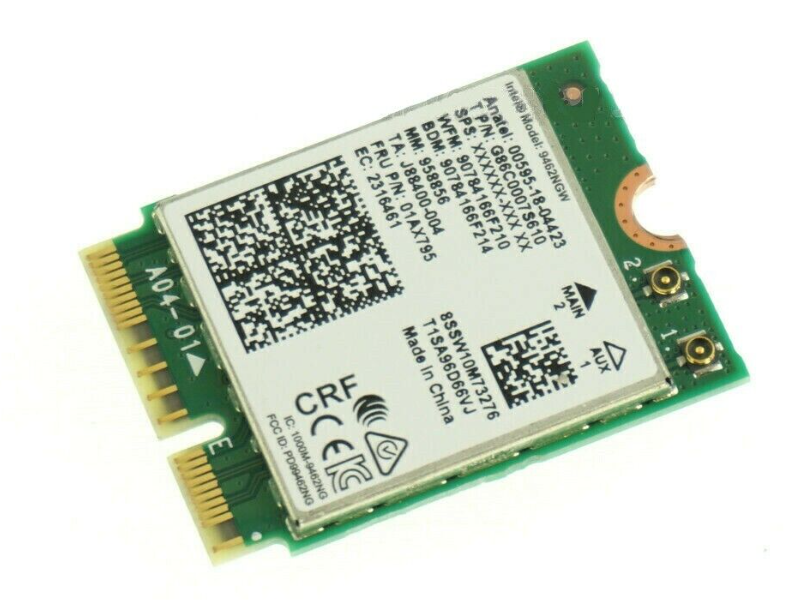
1. Parts of Laptop Bluetooth
Wi-Fi + Bluetooth Card (Mini PCIe या M.2 NGFF) Laptop के अंदर bottom cover के नीचे मिलता है Wi-Fi और Bluetooth दोनों signals को handle करता है
Antenna Cable दो पतले wires – black और white Wi-Fi और Bluetooth दोनों के लिए shared होते हैं
Motherboard Connection Slot Card को M.2 या PCIe slot में लगाया जाता है
Driver/Chipset Card के अंदर एक छोटा IC होता है जो Bluetooth transmission को handle करता है
2. How Laptop Bluetooth Works
- Bluetooth chip 2.4 GHz frequency पर radio waves भेजता और receive करता है
- Antenna signal को boost करता है
- Motherboard और OS driver उस signal को process करके devices से communication करता है
- Paired device से data wirelessly exchange होता है
3. Common Bluetooth Problems
| समस्या | कारण |
| Bluetooth Device Manager में नहीं दिख रहा | Card detect नहीं हो रहा या driver missing है |
| Bluetooth चालू है लेकिन connect नहीं हो रहा | Driver conflict या antenna issue |
| Signal बहुत weak है | Damaged antenna या faulty card |
| Sleep/restart के बाद Bluetooth गायब | Power management setting या card failure |
4. How to Repair Laptop Bluetooth
A. Software Repair
Bluetooth Enable है या नहीं चेक करें Windows → Settings → Devices → Bluetooth → Turn On
Drivers Reinstall करें Device Manager → Network Adapters → Bluetooth adapter पर right-click → Update या Uninstall & Reinstall
BIOS में Enable करें कुछ laptops में BIOS से Bluetooth disable किया जा सकता है
Airplane Mode / Fn Key चेक करें Wireless functions enable हैं या नहीं, Fn + Wireless key से चेक करें
B. Hardware Repair (अगर software से ठीक न हो)
Tools Needed: Small screwdriver set, plastic pry tool, multimeter (optional)
Steps: Laptop को power off करें और battery निकालें (अगर removable हो) Bottom cover खोलें Wi-Fi + Bluetooth card locate करें (2 thin wires वाला छोटा card) Antenna cables को securely reconnect करें Card को निकालें → Slot को साफ करें → दुबारा लगाएं अगर फिर भी काम नहीं कर रहा, तो compatible module से replace करें (₹500–₹1,500) Motherboard USB lane चेक करें – Bluetooth signal USB lines से जाता है, damage होने पर detect नहीं होता
5. Temporary Solution
अगर internal Bluetooth dead है: USB Bluetooth Dongle (₹200–₹400) इस्तेमाल करें – Plug & Play solution है